ghwatch
Watch the CI of your GitHub pull requests from the terminal: one tab per PR, every check with its state, and a desktop notification when a job fails. Works with GitHub Actions and with external CI such as Prow / OpenShift CI.
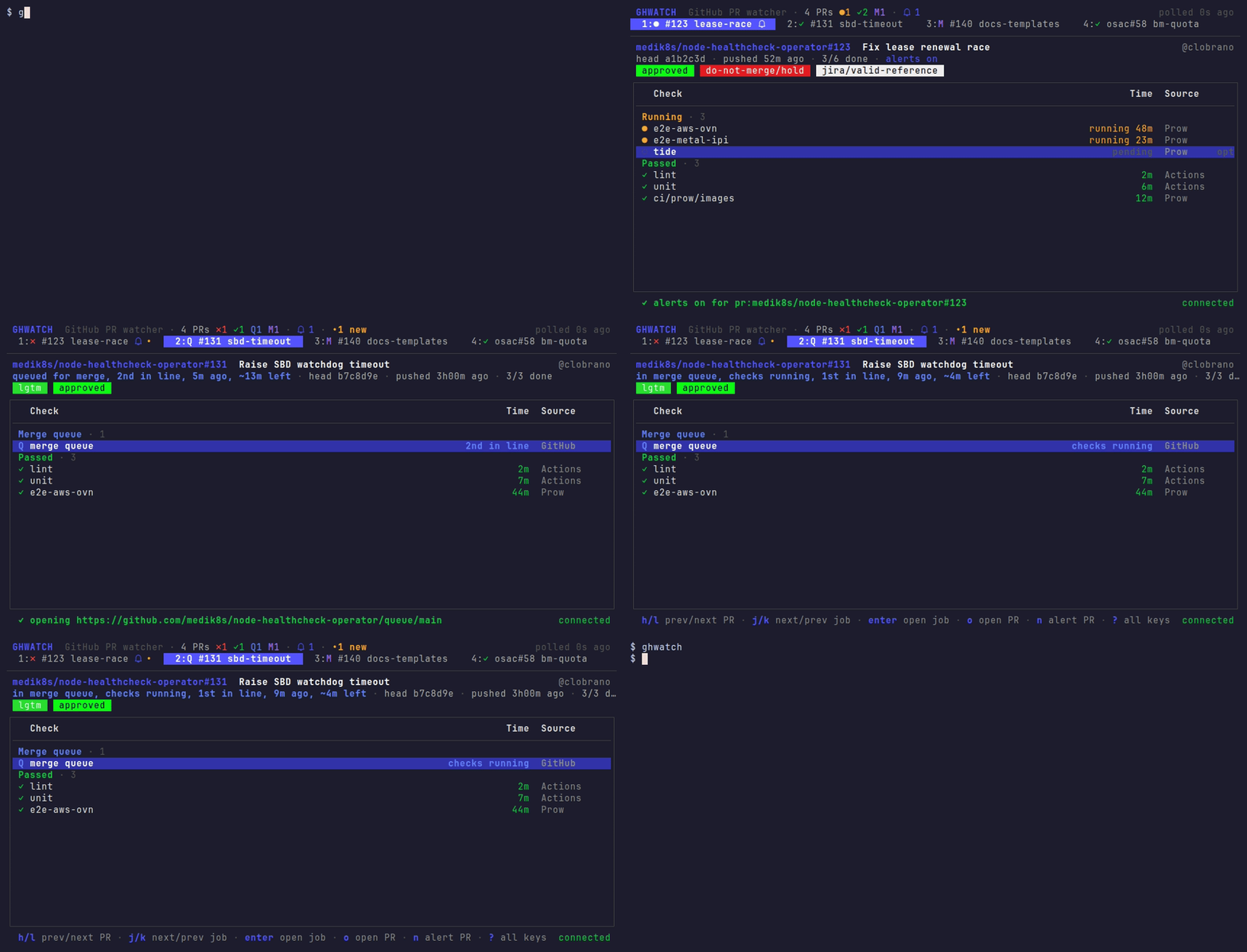
Quick start
go install github.com/clobrano/ghwatch/cmd/ghwatch@latest
ghwatch
Press a, paste a pull request URL, and it shows up in a new tab. ghwatch
uses your gh login (or $GITHUB_TOKEN), so there is nothing else to set up.
The keys you need day to day:
| Key | Action |
|---|---|
h / l | previous / next PR |
j / k | next / previous thread or job |
v | switch between the PR’s comments and its checks |
enter | open the selected comment, or job, in the browser |
o | open the PR in the browser |
a / d | add / remove a PR |
? | all the other keys |
q | quit |
The footer always shows the main keys. docs/tui.md describes the screen in detail.
Notifications
Notifications are off until you ask for them:
non a PR: notify about its checks (failures, all passed, new push, merged) and new comments.bon a comment thread: notify about new comments in it. On a job (pressvto see the checks): notify about that job only.mon a PR: mute all its notifications;magain restores them as they were.con a PR: clear all its notifications, the PR’s, its jobs’ and its threads'.N: choose which events notify, or mute everything.
Notifications stay on screen for 30 seconds (timeout below), where the
desktop allows it (GNOME ignores it and uses its own, shorter timing). They need
notify-send (libnotify). Clicking one opens the job or PR page.
Even without notifications, nothing goes unnoticed: a PR whose state
changed since you last looked gets an orange • on its tab, and the
title bar counts them (•2 new). New comments, in the conversation or on
code, get a comment mark with their count on the tab, and are listed
first. Both clear when you go to that tab.
More
tmux status line
set -g status-right '#(ghwatch status) %H:%M'
set -g status-interval 10
This shows e.g. PR ●3 ✓5 ✗1 •2 4: running, passed and failed PRs, how
many changed since you last looked, and how many new comments
(after a comment mark). A trailing ! means the data is stale.
ghwatch status reads a local file, so it costs nothing to refresh often.
ghwatch uses 24-bit colors. Inside tmux, enable true color, or the colors are approximated:
set -as terminal-features ',xterm-256color:RGB'
Notifications without a TUI open
ghwatch runs a small background process (the daemon) that polls GitHub for every open TUI. The TUI starts it, and it stops 10 seconds after the last TUI closes. To keep notifications and the tmux line live with no TUI open, run it yourself, for example in a tmux window:
ghwatch -serve
Command line
ghwatch add <PR URL or owner/repo#N>   # watch a PR
ghwatch rm <PR>                        # stop watching it
ghwatch ls                             # list watched PRs
ghwatch checks <PR>                    # print a PR's checks, fetched now
ghwatch status [-json]                 # one-line summary, or the full state
ghwatch stop                           # stop the daemon, e.g. after a rebuild
ghwatch icons                          # preview the icon sets
Configuration
Optional, in ~/.config/ghwatch/config.toml:
interval = "60s"            # how often to poll GitHub (minimum 10s)
browser = "firefox"         # default: $BROWSER, then xdg-open
icons = "fancy"             # or "safe" if some icons show as boxes
theme = "frappe"            # Catppuccin flavor: latte, frappe, macchiato or mocha
status_template = 'PR {{if .Failed}}{{icon "failed"}}{{.Failed}}{{end}}'

[notify]
backend = "desktop"         # desktop | exec | none
timeout = "30s"             # how long notifications stay on screen
# command = "curl -s -d @- ntfy.sh/my-topic"   # for backend = "exec"

[comments]
ignore_authors = ["openshift-ci-robot", "openshift-merge-robot"]
- Theme: the colors are a Catppuccin
flavor, Frappé by default. ghwatch keeps your terminal’s background,
so pick the flavor closest to it (
lattefor a light one). - Icons:
icons = "safe"uses characters every common monospace font has. Runghwatch iconsto compare the sets in your terminal. - Status template: a Go
text/templateover.Running,.Pending,.Passed,.Failed,.Queued,.Merged,.Closed,.Total,.Unseen,.Commentsand.Stale.{{icon "<state>"}}prints a state’s icon, and{{icon "comment"}}the comment mark. - Ignored authors: comments by these GitHub logins are never new and never notify, e.g. CI bots. Empty by default: bots count like everyone. Your own comments never count.
- Exec notifier: the
execbackend pipes each notification as JSON tocommand, to send it anywhere, e.g. ntfy.sh or a chat webhook. - The watched PRs are in
~/.config/ghwatch/watch, one per line. You can edit the file by hand.
Requirements
- A GitHub token:
gh auth login, or$GITHUB_TOKEN. - Linux; it also builds on macOS and the BSDs, where notifications need the
execbackend. - Optional:
notify-sendfor notifications,xdg-open(or$BROWSER) for links, and a Nerd Font for the alert bell and, with the fancy icons, the comment mark (icons = "safe"uses acinstead).
Development
docs/development.md covers how ghwatch works, the code layout, extension points and re-recording the demo. docs/decisions.md explains the design choices, and docs/snapshot.md the state format other tools can read.